
Weather Puppy - App & Widget
Weather Creative Inc.Weather
4.96.19K Reviews
- Version
- 6.2.7
- Installs
- 1.00M
- Age Rating
- Teen
Screenshots
Our Review of Weather Puppy - App & Widget
 Analysis by Appyee
On an ordinary morning, I often check the forecast before deciding whether to walk, cycle, or grab a jacket. Weather Puppy makes that small routine more cheerful by pairing weather information with puppy imagery. The appeal is easy to understand: I get a quick forecast, and the screen feels friendlier than the plain number-and-cloud layouts common in weather apps.
That lighter presentation is the point, not a replacement for careful planning. Weather Puppy is a free weather app from Weather Creative Inc., currently at version 6.1.8, and it has drawn a 4.9 average from around 32,000 ratings. More than 500,000 people have installed it. Those figures suggest that the mix of forecast utility and a playful visual style has found an audience, though a high rating alone cannot tell you whether its presentation suits your habits.
A cheerful forecast for everyday decisions
The puppy-focused design is most useful when I want to glance at the weather without turning the check into a chore. If you already look at your phone before taking the dog out, commuting, or choosing what to wear, the visual treatment can make the habit feel more pleasant. It is a small benefit, but one that matters if a conventional forecast screen feels dull or overly dense.
For a realistic example, imagine checking the app before leaving for work. The current conditions and forecast help you make a quick call about a coat or an umbrella, while the puppy gives the screen a bit of personality. If you have a longer outdoor plan, I would still take time to examine the forecast rather than relying on a glance; a cute interface should make weather easier to check, not encourage you to skip the details.
Where its style helps—and where it may not
I’d recommend it most to people who want familiar weather information presented with warmth, especially anyone who enjoys dogs or likes personalizing a home screen. It also makes sense for a household where checking the forecast is a shared routine: a friendly screen can be more inviting to younger family members, although the app’s content rating is Teen, so parents should check that rating against their own preferences.
If you want a restrained, information-first display, this may not be your best fit. A standard weather app can be easier to scan when you care mainly about compact figures, maps, or a no-frills layout. The same goes for people who make decisions around demanding outdoor conditions: use a source that presents the specific detail you need clearly, and treat Weather Puppy as a convenient everyday option rather than assuming its cheerful look guarantees every forecast will suit every situation.
Personalization without losing the practical purpose
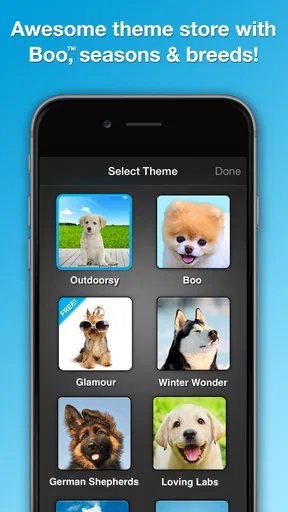
The theme choices give the app an identity beyond its forecast screen. Picking a dog style that you like can make repeated checks feel more personal, and the option to buy additional themes gives users a way to change the look. I would treat paid themes as optional decoration, not as a reason to install the app: the useful question is whether the basic experience works for you before spending anything.
Weather Puppy is free to download, with in-app purchases ranging from $0.99 to $49.99 per item. That wide span is worth keeping in mind if you browse its extras, since a free starting point does not mean every customization is free. I’d first try the available presentation and see whether I actually enjoy seeing it day after day; if the novelty wears off, buying more themes is unlikely to fix that.
Adorable Interface Meets Functionality
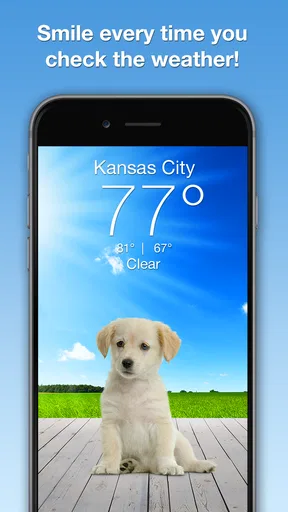
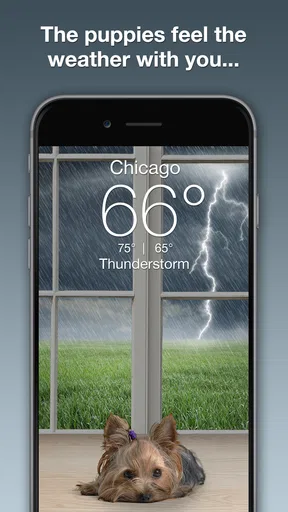
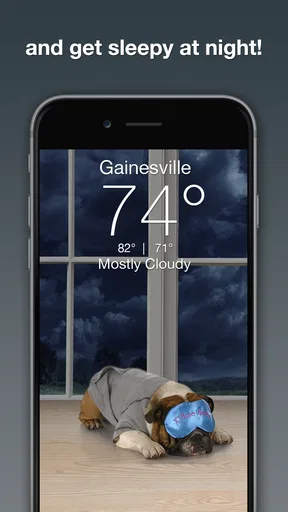
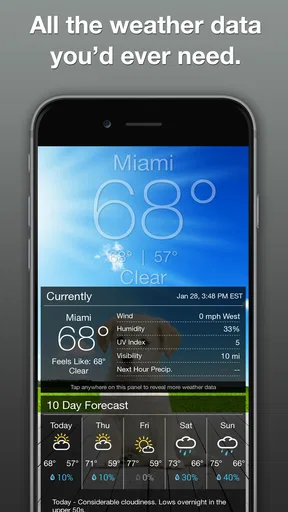
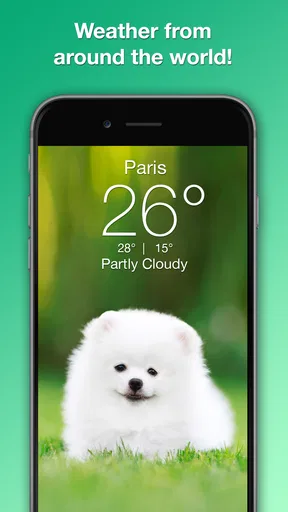
From the moment you open Weather Puppy, you’re greeted with a delightful image of a puppy that changes with the weather and time of day. It’s like getting a daily dose of cuteness therapy. The app’s interface is clean and user-friendly, making it easy to navigate through the features. You’ve got your standard weather information — current temperature, hourly and weekly forecasts — but the real charm lies in how it’s presented.
Customizable Themes
One of the coolest features is the ability to customize your puppy theme. Whether you're a fan of golden retrievers or prefer a dachshund, there’s a pup for you. You can even purchase additional themes if you’re feeling fancy. The themes are not just visually pleasing but also add a personal touch that makes checking the weather feel less like a chore and more like a treat.
Weather Updates and Alerts
Functionality-wise, Weather Puppy doesn’t skimp on the details. It offers accurate weather forecasts powered by Weather Underground, so you’re always in the know about any changes. The app provides crucial weather alerts, which are especially handy if you’re planning a day out or just want to be prepared for sudden weather changes.
Widgets for Quick Access
If you’re like me and love having everything at a glance, the widget feature is a game-changer. You can add the Weather Puppy widget to your home screen for quick weather updates without having to open the app. It’s convenient and still manages to bring a smile with its adorable puppy images.
Share the Cuteness
One fun aspect of the app is the ability to share your puppy-themed weather updates with friends and family. Whether you want to brighten someone’s day or just show off your personalized puppy theme, sharing is simple and adds a social element to the app.
Performance and User Experience
The app runs smoothly without any noticeable lags, which is a big plus. It’s lightweight and doesn’t drain your battery, making it perfect for everyday use. The user experience is top-notch, combining both utility and entertainment effortlessly.
A practical way to make a habit stick
A less obvious strength here is how the visual design can support a routine. If you tend to forget to check conditions until you are already outside, placing the widget somewhere you naturally look may help turn a weather check into a quick daily habit. I would use it as a prompt, then open the full app when the day’s plans depend on more than a simple glance.
That distinction is useful: the widget is best for convenience, while the app itself is where I would spend more time reviewing what the day may bring. A widget can reduce friction, but it also encourages fast decisions. Before a long drive, a hike, or an event where changing conditions matter, I would deliberately open the forecast and read it rather than treating a home-screen snapshot as the whole picture.
Choosing the right place for the widget
Home-screen space is limited, so I’d choose the widget only if I genuinely check the weather often. It earns its place when it replaces repeated app-opening, especially during a busy morning. If you already have a crowded screen or prefer a minimal layout, opening the app when needed may be the better trade-off; the puppy artwork is pleasant, but convenience should matter more than decoration.
Sharing is another feature I’d keep occasional rather than make part of every forecast check. It can be a fun way to send a weather-themed image to someone who likes dogs, but it is not a core reason to choose a forecasting tool. I would compare the shared view with the actual purpose of the message: if a friend needs to know whether rain is coming, a clear forecast detail matters more than the cute presentation around it.
Getting more from the forecast
For an ordinary day, I find it useful to check once while getting ready and again before a later outdoor plan. The first glance helps with clothes and commuting; the second catches changes that could affect a walk or evening errand. That simple two-stage workflow is more reliable than assuming the morning view will remain relevant all day, and it does not require treating the app as a constant source of alerts.
Weather alerts can be valuable when conditions shift, but I would not rely on any single phone app as my only safety plan for severe weather. Keep the app’s alerts enabled if they suit your needs, and pay attention to official local guidance when a situation is serious. For casual decisions, the built-in forecast and alerts are convenient; for high-stakes planning, checking an additional trusted source is a sensible habit.
How it compares with familiar weather apps
Compared with the usual weather apps, Weather Puppy’s clearest difference is emotional rather than technical: it puts a dog-centered visual experience alongside everyday forecast information. Many alternatives prioritize a compact dashboard or a map-heavy presentation. Those can be better when you want to scan lots of detail quickly, while Weather Puppy is a stronger match when you value an approachable screen and enjoy choosing a theme.
I would not switch from a specialist weather tool solely for the artwork if my routine depends on detailed radar or highly focused data views. On the other hand, if your needs are basic—checking current conditions and looking ahead before ordinary plans—the playful treatment may be enough to make this the app you actually open. In practice, the best weather app is not always the one with the busiest interface; it is the one that gives you the information you need in a form you will use.
What existing users should consider
The current version is 6.1.8, and the app has been available since January 29, 2015. That release history shows a product with a long presence in the weather category, but it does not by itself tell me which features changed along the way. I would avoid assuming that a particular update introduced a specific tool unless the app itself makes that clear.
For someone who already uses it, the practical test is whether the current forecast layout, widget, and chosen theme still fit the way they check the weather. If the app continues to make quick checks easy, there may be no need to change a familiar setup. If you find yourself repeatedly opening another app for a view you need, that is a sign to use the other source for that task rather than expecting the puppy-themed interface to cover every weather workflow.
Small frictions worth weighing
The most obvious trade-off is that personality takes screen space and attention. Some people will enjoy the image; others may prefer figures and alerts to be the first thing they see. Theme purchases are another consideration: they can make the app feel more yours, but they are optional and do not change the basic question of whether you like the forecast experience.
There is also a difference between a friendly interface and a guarantee of accuracy. Forecasts can change, and local conditions can differ from what a broad forecast suggests. I’d use the app to plan normal errands, then double-check when timing or safety matters. That is not a flaw unique to this app; it is simply a sensible way to use any weather forecast.
Who should give it a try
If you like dogs, appreciate a bit of character on your phone, and mostly need weather information for everyday choices, I think Weather Puppy is an easy app to consider. Its free entry point makes it straightforward to try without paying for a theme, and the widget can make routine checks faster. It is also a reasonable choice for someone who wants a softer alternative to a dense, technical-looking forecast screen.
I’d skip it if you strongly prefer minimalist displays, need specialized map tools as your main way to read weather, or do not want optional theme purchases appearing in the experience. You can still use a conventional forecast app for those needs and keep Weather Puppy for casual checks, but there is no reason to maintain two apps if one already gives you everything you want.
Final Thoughts
In a world where checking the weather might not be the most exciting task, Weather Puppy manages to spice things up with its delightful puppy themes and solid weather reporting. It’s not just about knowing if you need an umbrella; it’s about making the mundane a bit more enjoyable. So, if you’re looking for a weather app that’s not only reliable but also adds a little happiness to your day, give Weather Puppy a try. After all, who doesn’t want a puppy greeting them every time they check the weather?
My final take is that the app succeeds when I treat it as a pleasant everyday companion, not as a reason to stop thinking critically about the forecast. Try the free version with a practical routine: add the widget only if you use it, choose a theme you will still like after the novelty settles, and check a second source for plans where conditions matter. If that balance sounds right, its combination of straightforward weather checks and dog-themed charm is genuinely appealing.
Verdict
Strengths of Weather Puppy - App & Widget
- Adorable puppy themes brighten forecasts.
- Accurate weather updates in real-time.
- Easy-to-use interface with smooth navigation.
- Customizable widgets for quick access.
- Minimal ads for a cleaner experience.
Limitations of Weather Puppy - App & Widget
- Limited theme options in free version.
- Occasional delays in weather updates.
- No radar or detailed maps available.
- Premium features require subscription.
- Widget customization options are basic.
Other Releases by Weather Creative Inc.
View All
Weather Kitty - App & Widget
Weather4.9

Weather BUB
Weather4.9

Grumpy Cat Weather
Weather4.9

Wildlife Weather
Weather4.7
Similar Picks in This Category
View All
Weather - By Xiaomi
Xiaomi Inc.4.1

Weather & Radar Forecast
WetterOnline4.8

Weather
OneLouder Apps4.6

AccuWeather: Weather Radar
AccuWeather3.6

The Weather Channel - Radar
The Weather Channel4.6

1Weather Forecasts & Radar
OneLouder Apps4.3
Frequently Asked Questions
What features does Weather Puppy offer?
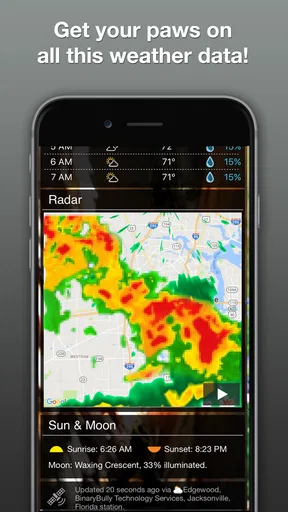
Weather Puppy provides real-time weather updates with engaging visual themes featuring adorable puppies. It includes detailed forecasts, hourly updates, and weather alerts. Users can also customize widgets for their home screens, select from various puppy themes, and enjoy additional insights like sunrise/sunset times and wind speed.
Is Weather Puppy free to use?
Weather Puppy is free to download and use, offering basic weather features and several puppy themes at no cost. However, it does contain ads. Users can opt for in-app purchases to remove ads and access premium features, including exclusive puppy themes and more detailed weather data.
How accurate is the weather information provided by Weather Puppy?
Weather Puppy sources its data from reliable meteorological services to ensure accurate and up-to-date weather information. While no weather app can guarantee 100% accuracy, users generally find the app’s forecasts to be dependable for daily planning. It's recommended to check multiple sources for critical weather events.
Can I customize the appearance of the app?
Yes, Weather Puppy allows extensive customization. Users can select from a variety of puppy themes to personalize their experience. The app also offers different widget styles and sizes that can be customized to fit the home screen aesthetics, making the weather-checking experience both functional and delightful.
Does Weather Puppy require access to my location?
For optimal performance, Weather Puppy requests access to your location to provide accurate local weather forecasts. You can enable this feature in your device settings. Alternatively, users can manually enter a location if they prefer not to share their device's location data.
